True Robotics Playground
True Robotics Playground is our free, drag-and-drop coding software for grades K-12, from Treads to our high school CTE Kit. Your students open app.truerobotics.org, pick their robot, and snap blocks into a program. No student ever needs a login, and we collect no data on your students.
How it works
One place to code all our robots

All of our robots are coded in the same place, so your students never have to learn a new tool as they move from one grade to the next. They choose their robot, and our software hands them the blocks that robot uses. Your teachers learn one piece of software for every robot, and only the blocks change as your students grow.
Blocks that grow with your students
Our scaffolded software levels up grade by grade: your students start by sequencing simple blocks, then add loops, conditionals, sensors, and the game controller.
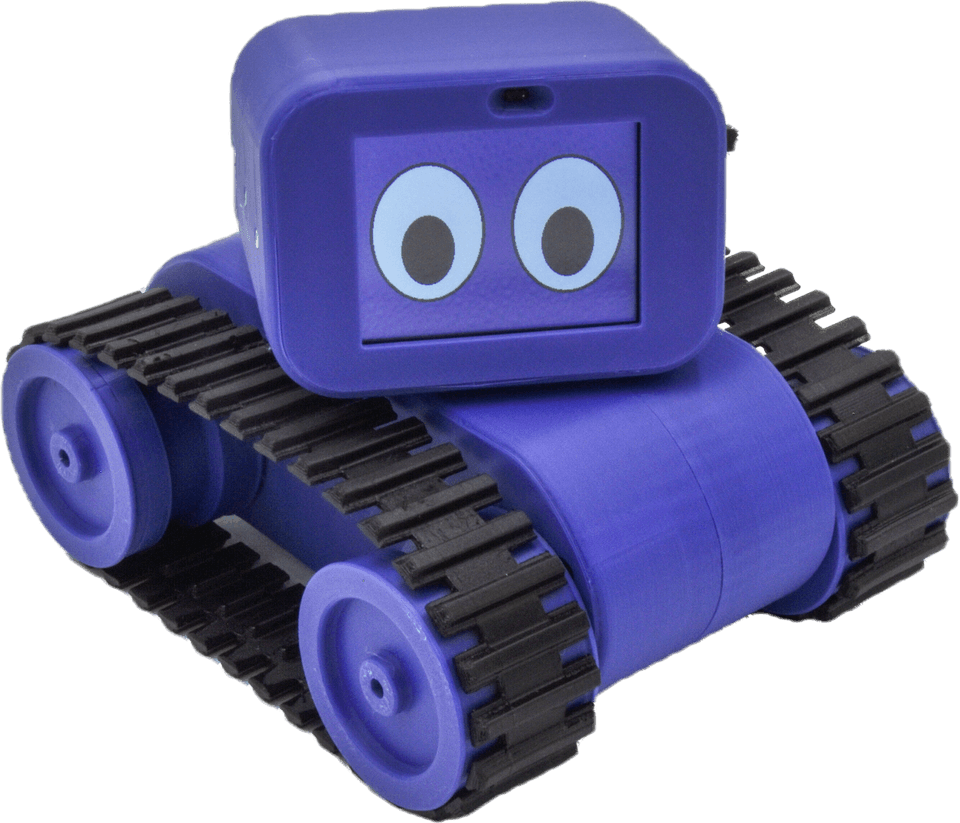
Grades K-3: Treads Robot, picture blocks with math and literacy inside them
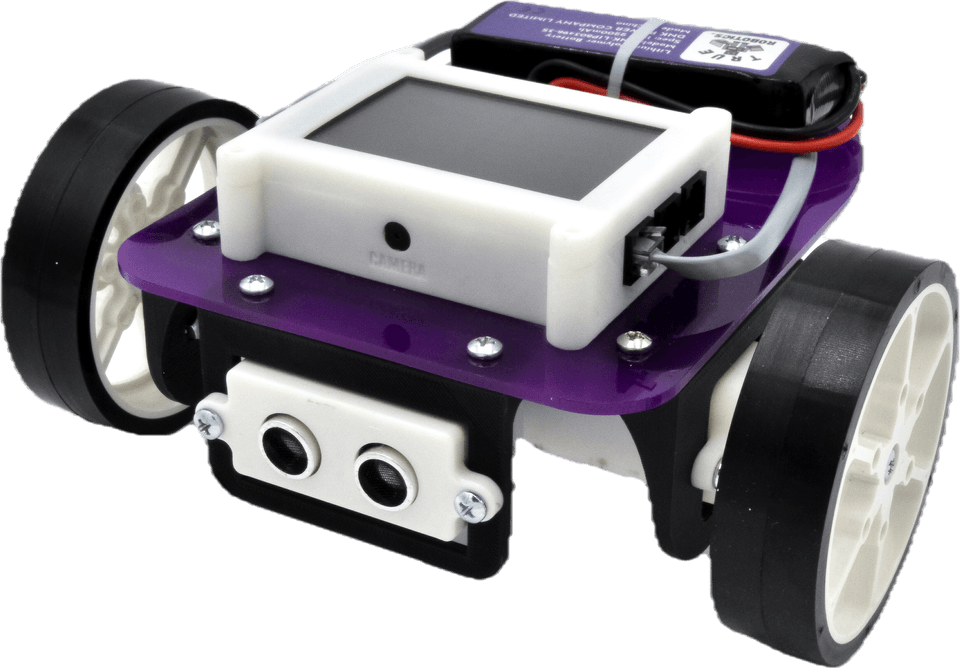
Grades 3-5: Pilot Robot Kit, blocks with more text, sensors, and the game controller
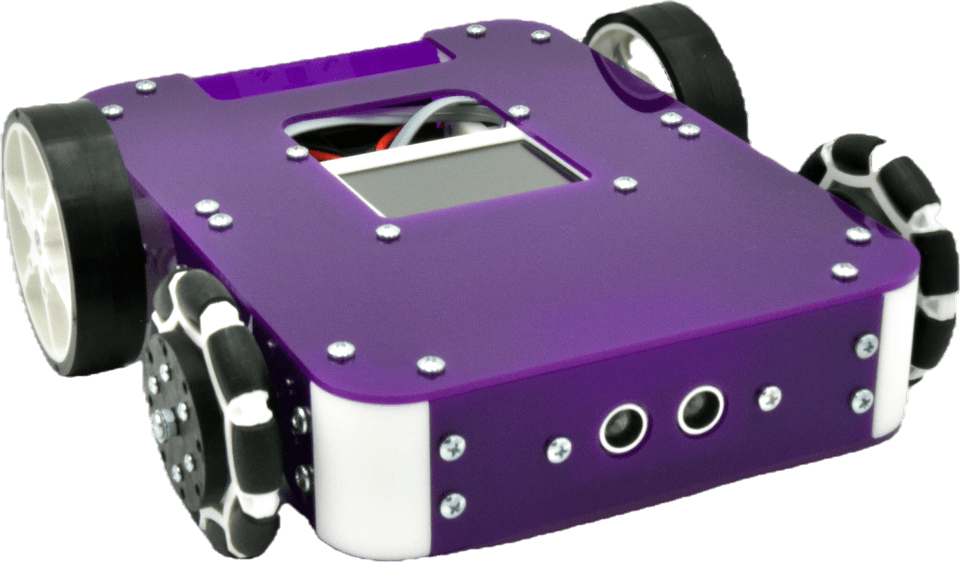
Introduction to Robotics with Axle
Grades 6-8: Axle Robot Kit, blocks with more text, two sensors, and motor control


For high school: our True Robotics CTE Kit for grades 8 to 12, which your students code in True Robotics Playground with blocks or Python.
Grades K-3
Math and literacy inside our blocks

For your youngest coders, we built math and literacy practice right into our Treads picture blocks, from addition and counting by fives and tens to rhyming words. The feedback is instant: a right answer sets the Treads Robot moving and a wrong one keeps it still, a great fit for math centers and small groups.
Bluetooth or USB
From the screen to the robot

When a program is ready, your students connect to their robot over Bluetooth or USB, upload it, and watch it run right on the robot. Because a program is simply uploaded, your robots are easy to share: one grade can build them, and every grade in your school can code them.
Student privacy
No student accounts

Your students never need a username or password for True Robotics Playground, so class time goes to coding instead of logging in.
- No student dataWe collect no data on your students, so their privacy is protected.
- Programs still saveYour students save right on their device, to keep working in a later class or hand a program in.
Devices and setup
A device for coding is the only thing your school needs to provide, and True Robotics Playground works on all of these:
- Windows
- Mac
- Chromebook
- iPad
- Android tablet
If your K-3 classes code on iPads, they can also download our Treads Playground app from the App Store (opens in a new tab).
| Device | Before your first lesson |
|---|---|
| Windows 10/11 | Install our Windows driver once from the settings gear at app.truerobotics.org. The install needs administrator rights. |
| Mac and Chromebook | Nothing to install. Open app.truerobotics.org and your students can start coding. |
| iPad | Download our app, and your students open it instead of a browser. |
| Browser | Our software opens in Google Chrome or Microsoft Edge, not in Safari. |
Training
Learning our software

Your teachers don’t need any coding experience. Short videos in our lessons walk your students through every step, so a teacher can learn right alongside the class, and our Learning Portal is open 24/7 for a refresher the night before a big programming lesson.
CAD Playground
Free CAD for students: the True Robotics Design Playground
Our True Robotics Design Playground is free CAD software that runs right in your web browser, so your students can design the plates, mounts, and spacers for their robots, print them, and test them for real. There’s nothing to install and no account to create, and it works great on Chromebooks.
Students in our high school course, Medical Robotics, design a custom part for every device they build here.
- Basic mode: drag shapes onto a grid, type exact sizes, and group them to join solids and cut holes
- Standard mode: sketch a shape, add dimensions, and extrude it into a 3D part, just like professional CAD
- Assemblies that put your parts together and show how they move
- STL files for any 3D printer, or STEP files for other CAD programs
- Projects save to your own folder, with no logins and no accounts
- Free for every student, teacher, and family
Questions about our software
What is True Robotics Playground?
True Robotics Playground is our free, drag-and-drop coding software, where your students program every True Robotics robot, from the Treads Robot to our True Robotics CTE Kit. Students open it at app.truerobotics.org, pick their robot, snap blocks into a program, and upload it to the robot over Bluetooth or USB. No student ever logs in, and we collect no student data. Our blocks grow with your students, from picture blocks for Treads to blocks with more text for Pilot and Axle, and blocks or Python on our 2027 CTE Kit.
How do students open the software, and does anything need installing?
Your students open True Robotics Playground at app.truerobotics.org and choose the robot they're using, and on a Chromebook or Mac there is nothing to install. Windows 10 and 11 computers need a driver from the settings gear in our software, and installing it needs administrator rights. On iPads, it is a downloadable app. Use Google Chrome or Microsoft Edge, because our software does not open in Safari. Our lesson videos walk your students through setup on every device.
How does the coding change from Treads to Pilot and Axle?
Our coding levels up with the robot, all inside True Robotics Playground. Treads uses simple picture blocks that your students snap together to make the robot drive a square, cross the room, or circle the desks. Pilot and Axle still use drag-and-drop blocks, with more text and fewer icons. There, your students sequence blocks for new challenges, use conditionals and loops, and program the ultrasonic and light sensors and the game controller.
Does True Robotics teach computer science?
Yes. Your students learn computer science in True Robotics Playground, our drag-and-drop coding software, by coding real robots. In kindergarten through 3rd grade, they snap picture blocks together to drive the Treads Robot. From 3rd grade on, they use blocks with more text, loops, conditionals, sensors, and the game controller on our Pilot and Axle kits. In Medical Robotics, our 2027 course for grades 8 to 12, they code the True Robotics CTE Kit in blocks or Python. All of our programs are aligned to the CSTA computer science standards.
Do students need usernames or passwords? What student data do you collect?
No. Your students never need a username or password for True Robotics Playground, and we collect no data on your students. That saves class time, since nobody is typing in a password, and it protects your students' privacy. Students can still save their programs to their Chromebook to keep working in a later class or hand one in to their teacher. Your teachers do have accounts, which we set up together in their 30-minute intro session.
What does the school need to provide?
Only the devices your students code on, such as the Chromebooks or iPads your school already has, and we at True Robotics provide everything else. Our robots work with any Windows, Mac, Chromebook, iPad, or Android tablet. We send our robots and kits with all required tools and pieces, the batteries and chargers, double the screws you'll need, and a game controller for Pilot and Axle. Our curriculum and teacher training come with them, too.
Bring hands-on coding to your school
Our Classroom Packages include reusable robot kits, grab-and-go curriculum, and one-on-one teacher training, and every robot is coded in True Robotics Playground. Interested in seeing it with your students? Get in touch with our team!